Run your security operations from one place
Shield brings the daily work of security operations into one product: registers of what you are responsible for, agents that check outside sources for anything that affects you, data fusion from Microsoft Intune and Defender with full control over every record, protection baselines, and vulnerability and risk management. A person decides what happens next.

One product for your security operations
Shield does the routine work in each feature and leaves the decisions to a person.
The Registers
- Shield
- Keeps assets, applications, suppliers, people, vulnerabilities and risks in one system, each record with an owner.
- You
- Confirm what connectors find, and assign owners in bulk.
Agents
- Shield
- Read public breach and vulnerability sources every night, match them against your suppliers and applications, and raise a case.
- You
- Answer an agent’s questions, and approve or reject each change it proposes.
Data Fusion & Control
- Shield
- Matches what Intune and Defender report into one record, keeps every version and source, and tells owners when reviews come due.
- You
- Activate drafts, resolve conflicts, and complete reviews.
Protection Baselines
- Shield
- Offers 28 ready-made measures, referenced to CIS Controls v8, and lists what follows each baseline.
- You
- Define a baseline per type of system, reword its measures, and assign what follows it.
Vulnerability Management
- Shield
- Rates each vulnerability per machine, using the asset’s data, EPSS and CISA KEV, and shows findings nobody has started on.
- You
- Decide what to fix first, and track remediation to its due date.
Risk Management
- Shield
- Rates risks on your own matrix, tracks treatment actions by deadline, and brings risks up for review.
- You
- Rate each risk, choose its treatment, and decide what to accept.
The records your security work runs on
There is one register per type of record, and they all work the same way: a list you can search and group, records that open in place, version history, and owners you can assign in bulk.

Assets
Laptops, servers, network devices, cloud accounts, data stores and repositories. Each has an owner, a criticality, the data it holds and the baseline it follows.
Applications
The SaaS and in-house applications your data lives in, with their owner, hosting, criticality and the supplier you buy them from.
Suppliers
Every external party that can reach your information or systems, with its risk class, access, personal data, assessments, and certificates with their expiry dates.
People
The people who own devices and applications, including the many who never sign in to Shield, with every name each system knows them by.
Risks
Scenarios rated with your own risk matrix, with the treatment the owner chose, its actions and deadlines, and the residual rating after treatment.
Vulnerabilities
One entry per vulnerability per affected asset, with its severity, whether a fix exists, its remediation state and its due date.
Agents propose, people approve
Agents monitor outside sources, match what they find against your records and raise a case for a person. They are optional: Shield works fully without them.
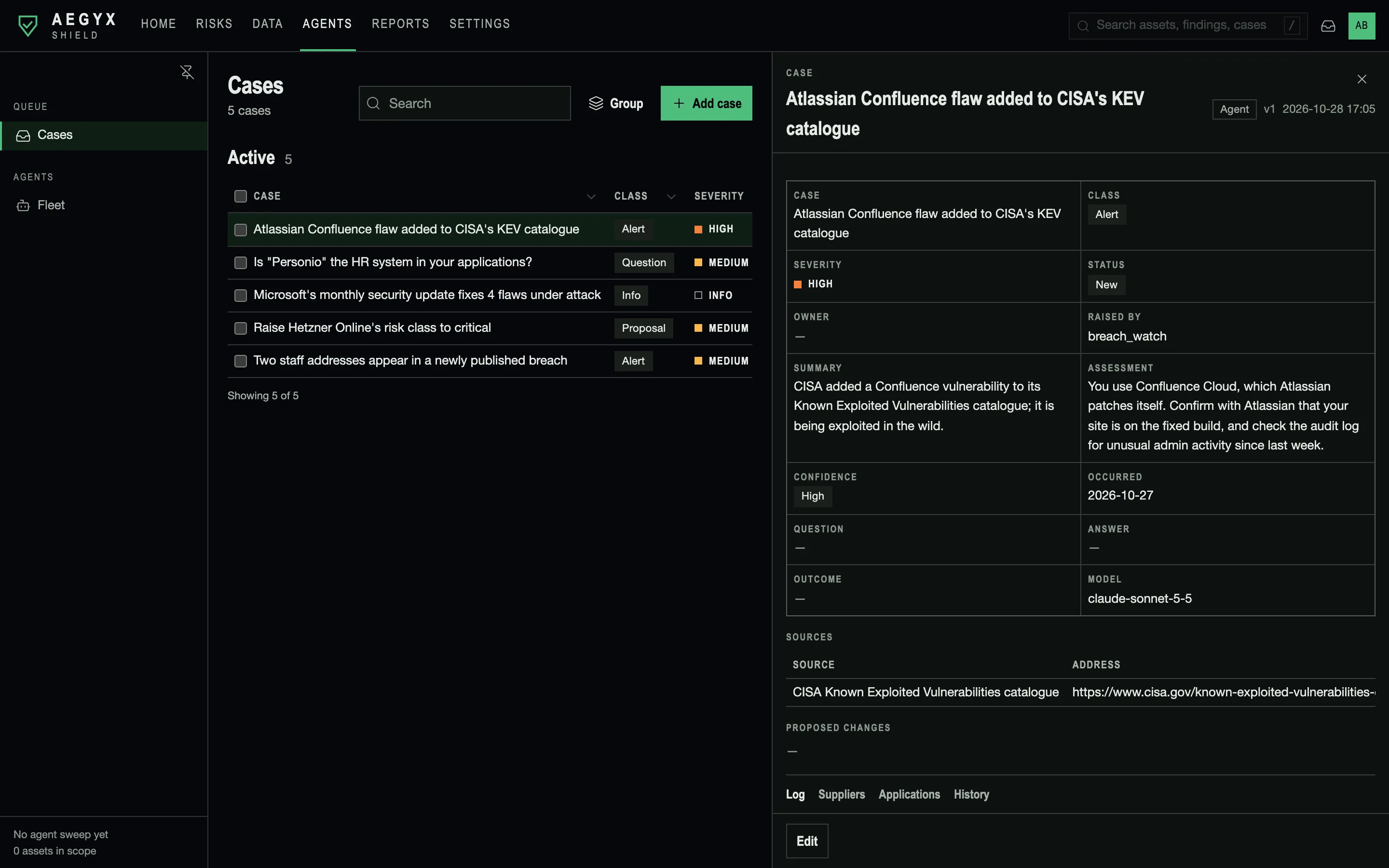
Cases
Everything an agent hands to a person is a case: information, an alert, a question or a proposal. Each case has a severity, an assessment, a confidence level, its sources and the records it concerns.
Breach Watch
Runs nightly. It reads Have I Been Pwned, CISA’s Known Exploited Vulnerabilities catalogue, SEC 8-K disclosures and six security news sites, and matches them against your suppliers and applications.
Local matching
Feeds are downloaded in full and matched inside your deployment, so no outside service learns which suppliers you use.
Questions and proposals
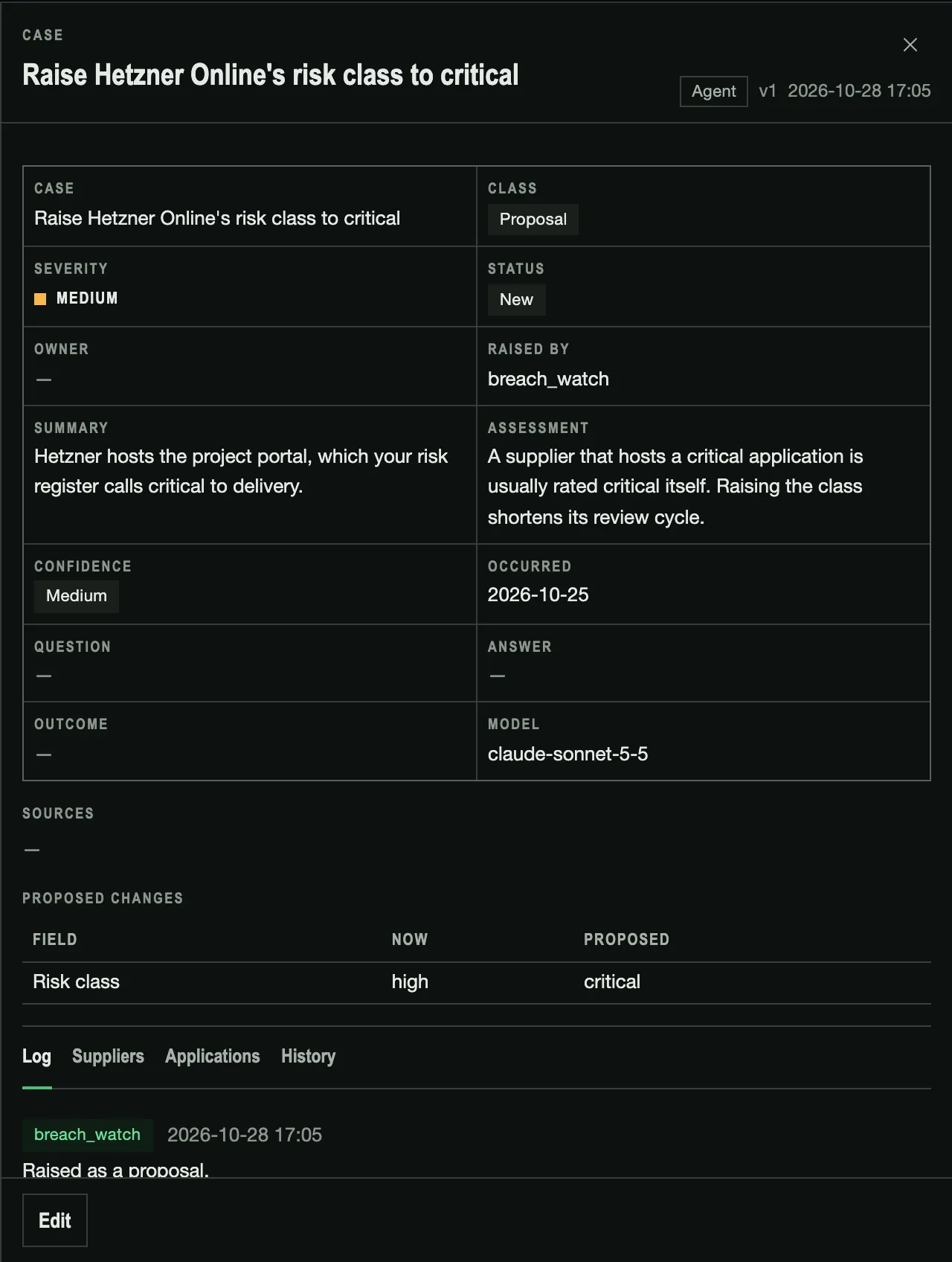
If the agent can’t tell whether “Atlas” in a headline is your CRM vendor, it asks. Your answer is saved as a note or turned into a proposed change, which a person approves or rejects.
Run logs
Each case links to the run that raised it: what the agent read, what the model concluded and what the code decided. Model exchanges are logged for 30 days.
Model choice and memory
Choose the model for each agent. What you tell an agent is stored as notes you can read, edit and delete.
Read-only database access
Agents connect through a database account without write permission. The database enforces this, and the test suite checks it.
A proposal, field by field
When an agent thinks a record is wrong, it proposes the change and explains why. A user with the approver role approves or rejects it. An approved change is recorded under the approver’s name, and the case logs the decision.
One record from every source
Each of your tools sees part of the picture. Shield combines what they report into a single record per laptop or person, and keeps each source’s view beside it.
- Microsoft IntuneManaged devices and their users
- Microsoft Defender for EndpointThe machines Defender knows
- Serial number
- Directory ID
- Address
- A tab with each source’s view
- Every identifier, under “Known as”
- Every version, with who or what made it
Microsoft Intune
Read-only. Every managed device and its user arrive as drafts on the first sync. Later syncs change only what has changed in Intune.
Microsoft Defender for Endpoint
Defender’s machines are matched to the ones from Intune, so each laptop is one record with both views. Machines only Defender knows become draft assets.
Matching across sources
Records are matched on serial number, directory ID and address, strongest identifier first. A renamed host stays the same record, and conflicts are flagged for a person to resolve.
When sources disagree
The first source keeps a field and the next fills only what is empty, unless you choose newest-wins. Either way, each source’s own values stay visible on the record.
Runs on a schedule
Connectors sync hourly, and each schedule can be changed. The outcome of every run is kept, and a failed sync goes to the responsible person’s inbox.
Encrypted credentials
Connector secrets are entered in Settings, encrypted at rest and never displayed again.
Know where every value came from
Each record shows who changed it, what each source reported, whether a person has confirmed it, and what it said before.
Source data
A tab per source shows the record as Intune or Defender reported it, and every identifier any source has used for it. An unexpected value can be traced to the system that supplied it.
Version history
Each change is stored as a version, with what changed and whether a person, a connector, an import or an agent made it. You can look up who changed a server’s owner in March.
Scheduled reviews
Set a review interval per register, for example yearly for suppliers and quarterly for risks. Owners are notified when a record is due, and each completed review is recorded.
Drafts until a person confirms
Records found by a connector or an agent arrive as drafts until a person activates them. Criticality, risk ratings and supplier risk classes can only be set by people.
Merging duplicates
Merge two records for the same laptop into one. Everything linked to either record moves to the one that remains, and a merge can be reversed.
Custom fields
Add fields such as a cost centre or a contract number to any register. They appear in the list, form, filters and history like the built-in fields.
Hardening standards as measures you can check
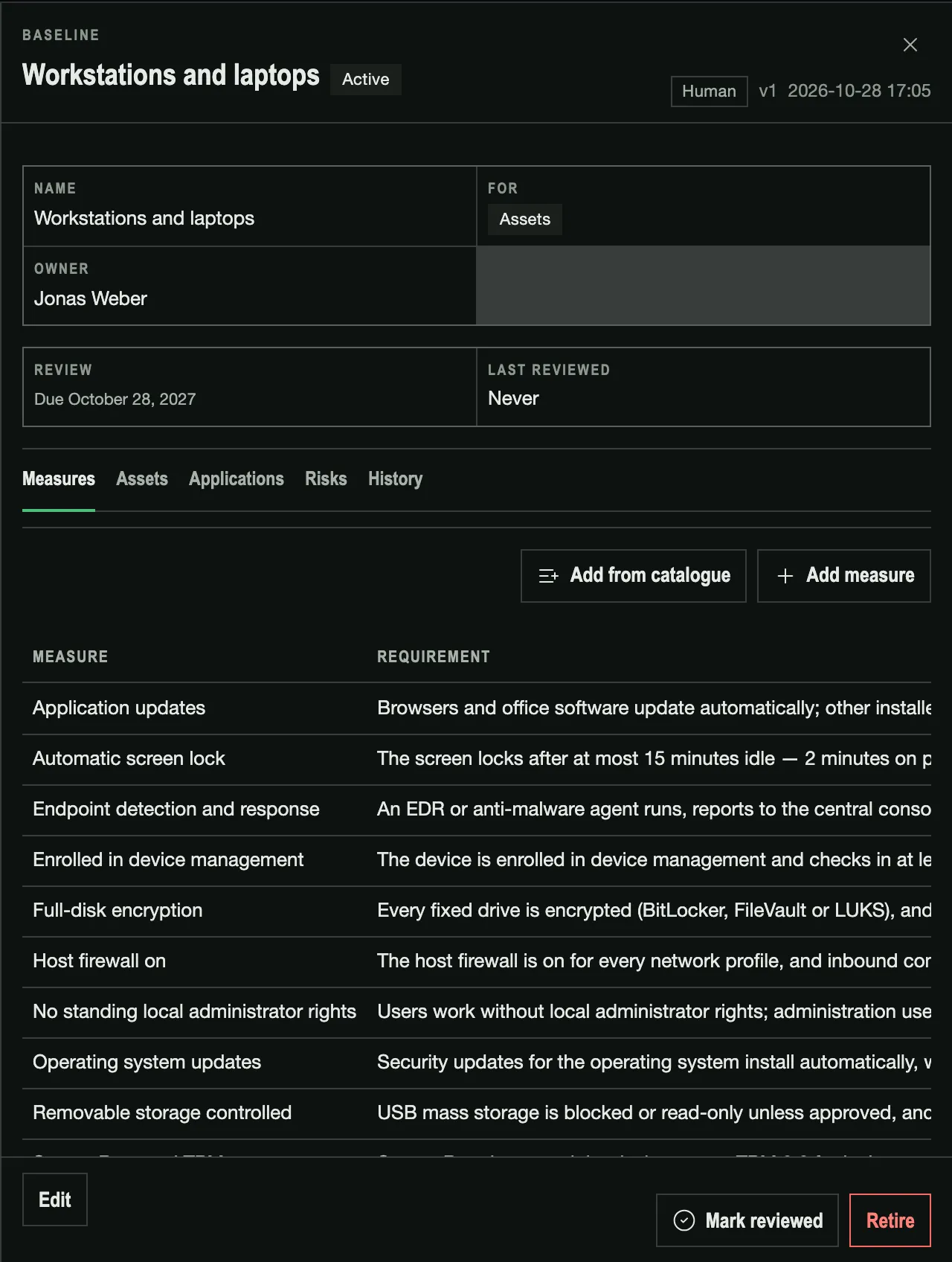
A baseline is the configuration standard for one type of system, written as specific measures. An auditor can see what each machine is required to meet.
One baseline per type of system
Define baselines such as “Windows laptops”, “Servers” or “Business applications”. Each asset and application follows one, and each baseline lists what follows it.
Specific measures
“Our laptops are hardened” becomes concrete requirements: BitLocker on every fixed drive, recovery key escrowed, screen lock after 15 minutes.
Measure catalogue
28 ready-made measures for assets and applications, each referenced to a CIS Controls v8 safeguard. You can reword any measure you adopt.
See which vulnerabilities matter on which machine
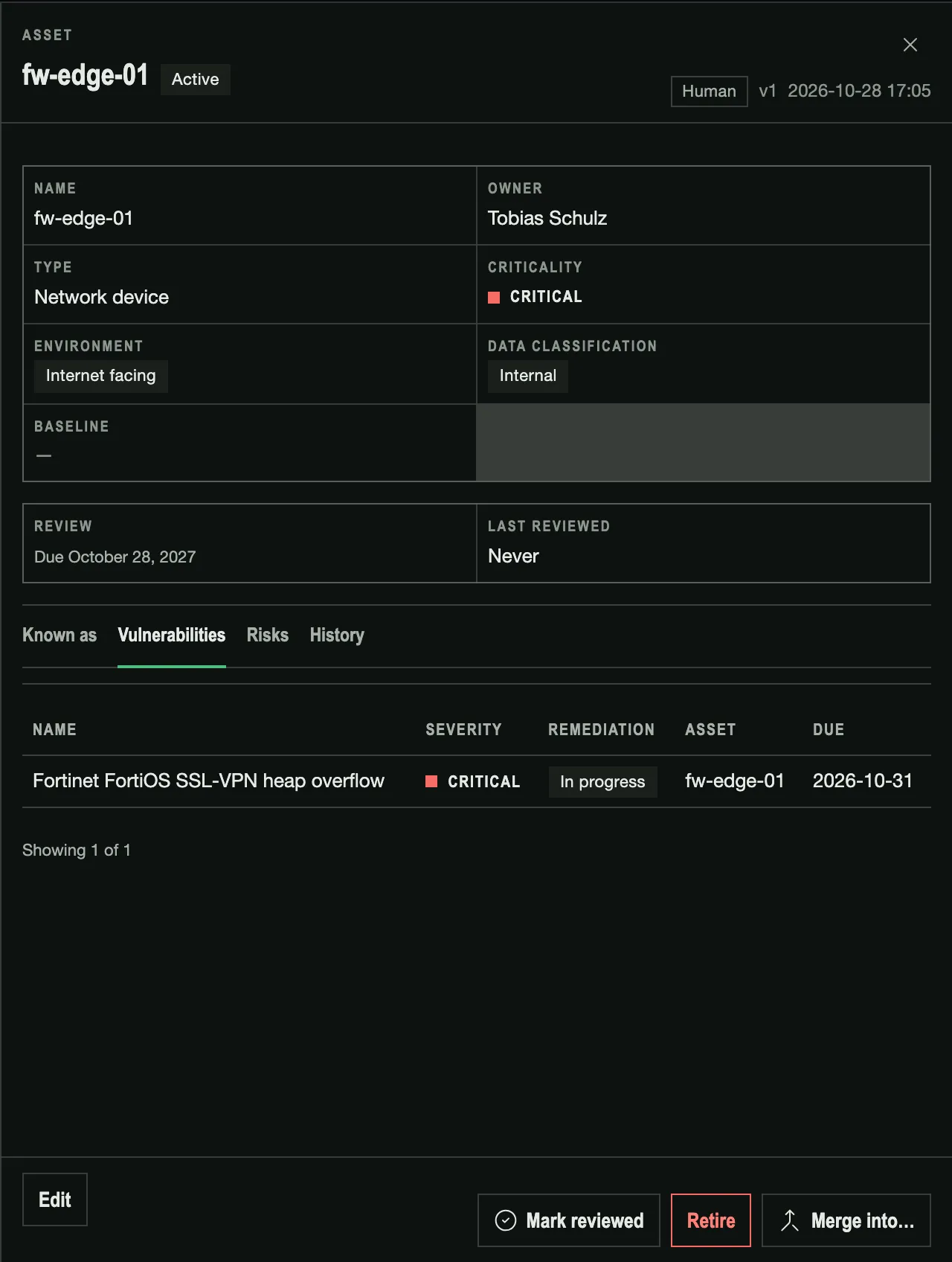
A flat CVSS list buries the findings that matter. Shield rates each vulnerability on each machine it affects, then tracks its remediation to the due date.
Severity per machine
A CVE gets a different severity on an internet-facing server than on an isolated lab machine, because the asset’s environment and criticality feed the score.
The CVSS standard, not an invented score
Shield applies the CVSS environmental and threat metrics, using data from the asset, EPSS and CISA KEV. You can tune the formula in Settings.
Exploited and fixable
Each entry shows its exploit likelihood, whether it is known to be exploited and whether a fix exists, so a medium CVSS on a production server can rank as critical.
Remediation per affected asset
Each affected machine has its own entry, with a remediation state and a due date, so “patched on 12 of 40” is twelve entries that moved and twenty-eight that did not.
On the asset and on Home
An asset’s record lists the vulnerabilities that affect it, and Home shows findings nobody has started on, by when they are due.
Risks rated, treated and followed up
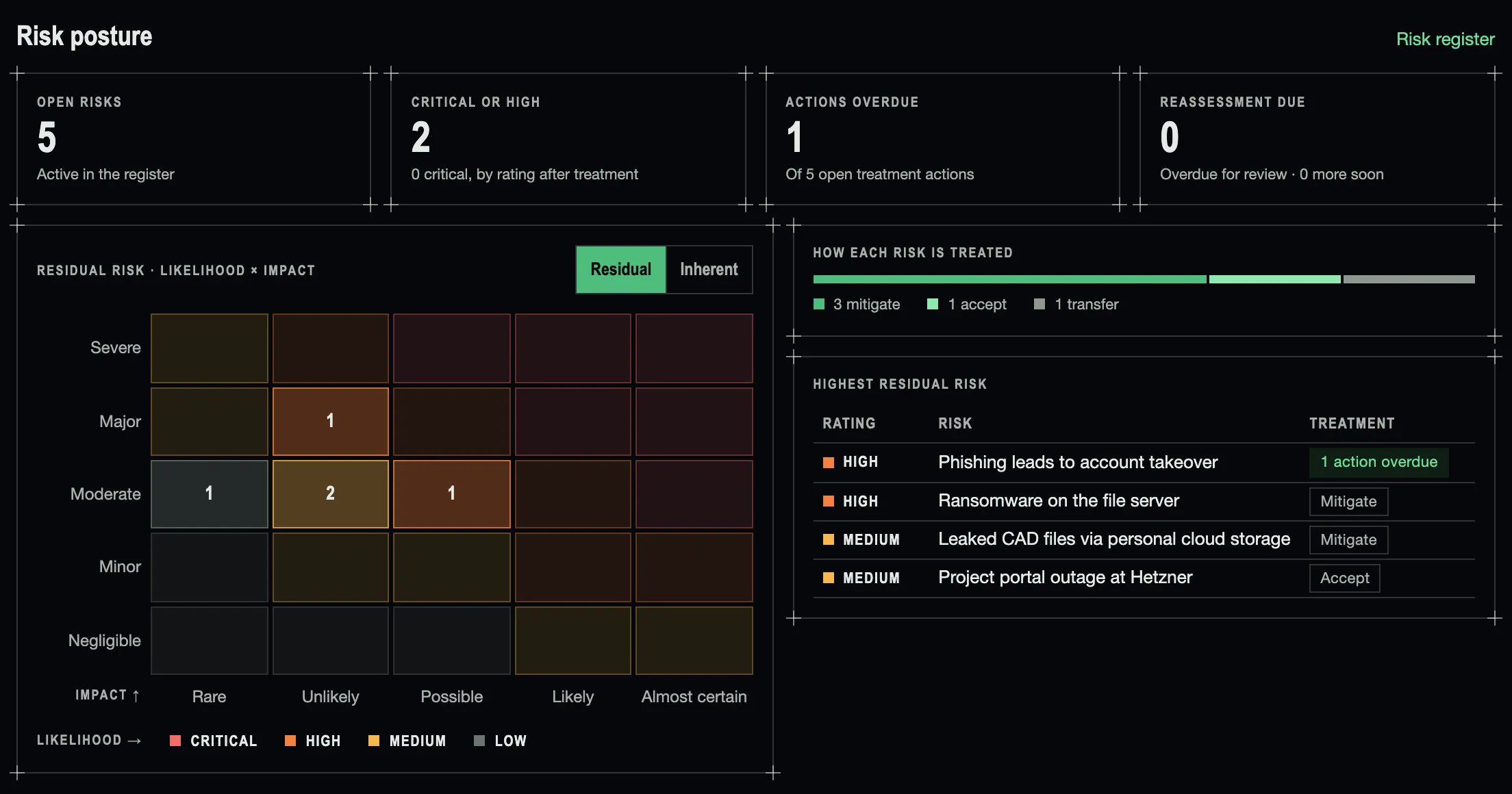
The risk register holds the scenarios your programme has assessed. Home shows where they stand: how many are rated high, how each is treated, and which treatment actions are overdue.
Your own risk matrix
Likelihood and impact are rated on the scales and matrix your organisation defines. Change the matrix and every risk is rescored.
Before and after treatment
Each risk has an inherent and a residual rating. The heat map on Home switches between the two.
Treatment and actions
The owner chooses to mitigate, accept, transfer or avoid. Treatment actions have owners and deadlines, and overdue ones show up on Home.
Linked to your records
A risk names the assets, applications, baselines and suppliers it concerns, the controls it relies on, and whether it is insured.
Reassessment history
Each reassessment is a dated version with the rating and who decided it, so you can follow a residual rating down over a year of treatment.
Scheduled reassessment
Risks come due for review on the interval you set, quarterly for example, and the owner is notified.
Agent + Human, by design
Agents use a database account without write access. What they find reaches a person as a case, linked to the run that produced it.
- Read public breach and vulnerability sources every night and match them against your suppliers and applications
- Ask when a match is unclear, and remember the answer
- Propose changes to a record field by field, with their reasoning and sources
- Answer an agent’s questions and correct what it remembers
- Approve or reject each change an agent proposes; approved changes are recorded under the approver’s name
- Set criticality, risk ratings and how far each supplier is trusted
Part of the Aegyx Suite
Shield works best alongside the rest of the platform.
Lighthouse
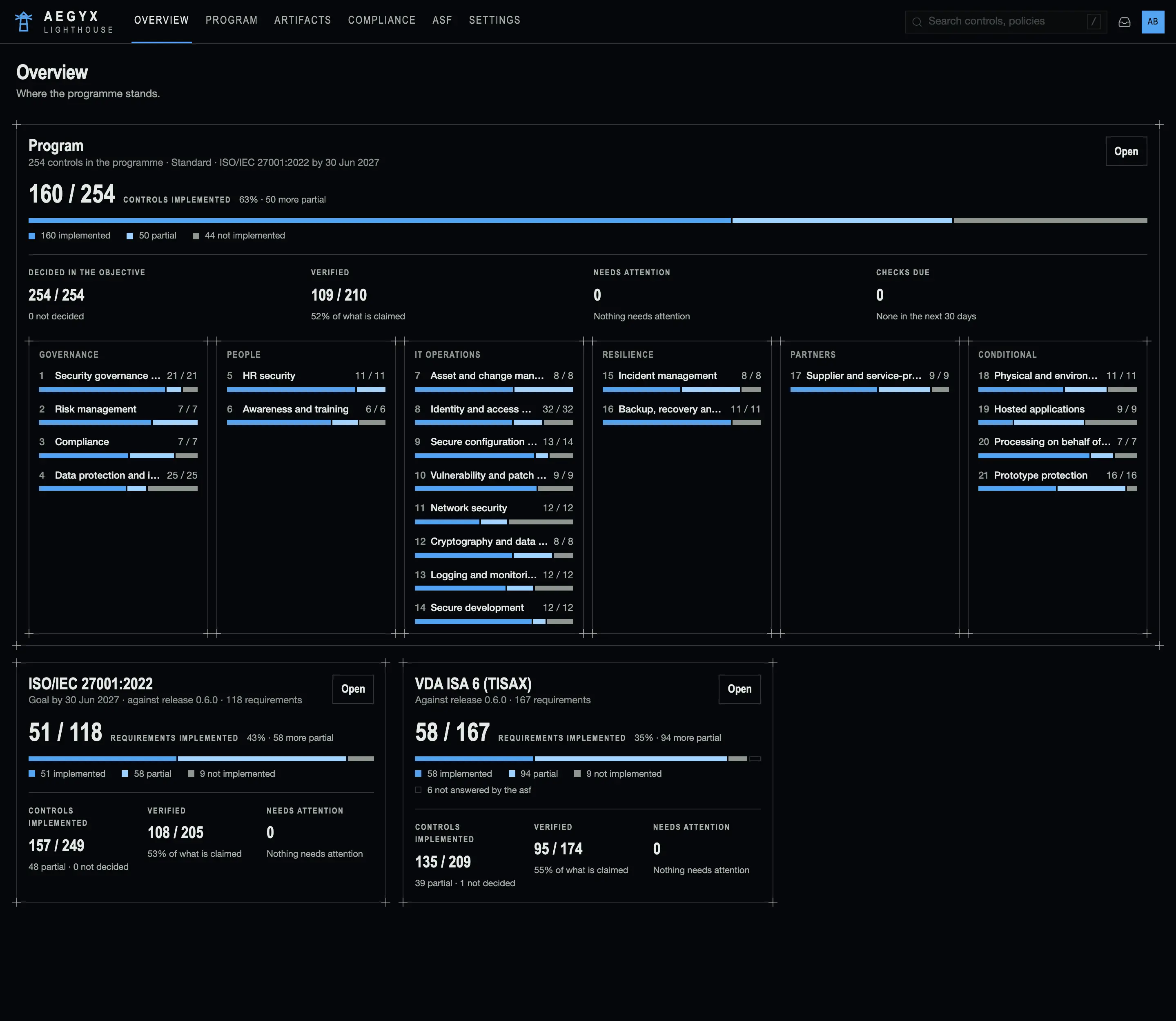
Run security compliance and governance in one product: program design, evidence tracking, ISO 27001 and TISAX compliance tracking, a policy and roles center, and management reviews. Routine work runs by itself, and a person makes each decision.
Spear
Assure your cybersecurity beyond basic cyber-defense; leverage a tailored, automated penetration testing strategy to continuously test your organization & its products against what's out there.
Ready to talk about Shield?
Get in touch and we'll walk you through what Shield can cover for your organization.